

How it works
kipmox parses the structure of your code locally, then the AI writes the prose. Because the facts come straight from your source, the document stays accurate — it describes what the code actually does, not a guess.1
Open a file
Open any Apex class, trigger, or Lightning Web Component.
2
Run Explain this code
Run kipmox: Explain this code — from the Command Palette (
Cmd+Shift+P / Ctrl+Shift+P), or by right-clicking the file in the editor or the Explorer.3
Read the document
A document opens beside your editor — overview, key methods, dependencies, and the file’s analysis findings.
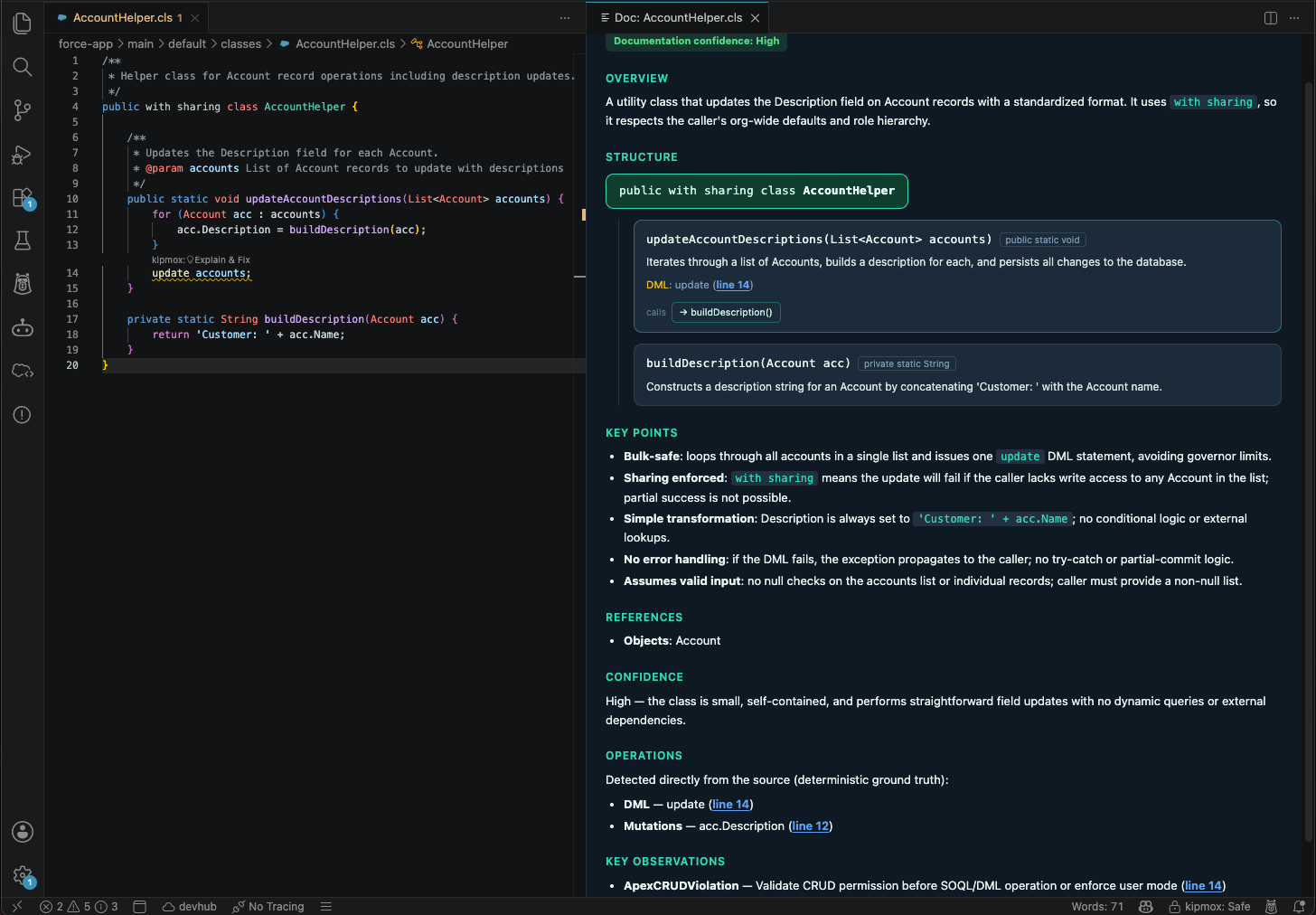
What’s in a document
What it works on
- Apex — classes and triggers
- Lightning Web Components — the full bundle (JavaScript, HTML, metadata)
On the Free plan you can generate 2 documents every 4 hours. Pro is never blocked. See Plans & Limits. Documentation works online or offline, like every kipmox AI action — see Offline Mode.
Common questions
How do I generate a document?
How do I generate a document?
Open the file, then run kipmox: Explain this code from the Command Palette (
Cmd+Shift+P / Ctrl+Shift+P) — or right-click the file (in the editor or the Explorer) and choose kipmox: Explain this code.Which files can I document?
Which files can I document?
Apex classes and triggers, and Lightning Web Components (the full bundle). Open one of these before running the command.
How accurate is the document?
How accurate is the document?
kipmox reads your code’s structure straight from the source, then the AI writes the prose around those facts — so the overview, methods, and references reflect what the code actually does, not a guess. The document also includes the file’s static-analysis findings.
Can I generate documentation offline?
Can I generate documentation offline?
Yes, on Pro — with Offline Mode the document is generated by a local model and your code never leaves your machine.
How many documents can I generate?
How many documents can I generate?
On Free, 2 documents every 4 hours. Pro is never blocked. See Plans & Limits.
Explain this code isn't doing anything
Explain this code isn't doing anything
Make sure a supported file (
.cls, .trigger, .js, .html) is the active editor tab. Documentation also counts toward your plan, so you may be prompted to sign in after your first couple of requests.How fixes are verified
Every AI change is checked before you rely on it
Offline Mode
Run kipmox fully local — your code stays on your machine